SMS and WhatsApp message consent

TapToChat can alert an account holder when a chat is waiting on them. Those alerts are optional, they are switched on by the account holder and nobody else, and this page reproduces the wording they agree to before a single one is sent.

Published without a login so that carriers, Twilio and Meta can review the opt-in without an account. The opt-in itself happens inside the product; this page documents it and collects nothing.

About the messaging programme

Who sends the messages
TapToChat, the live chat product at taptochat.io. Messages come from us and are never sent by a third party on our behalf, nor on behalf of anyone else.
Who receives them
Only a signed-in account holder who has entered their own mobile number and ticked the box. We never message a visitor to a customer's website, and we never use a number obtained from anywhere but the account holder.
What the messages contain
Account and conversation alerts: a new chat is waiting, a chat has gone unanswered, or something on the account needs attention. No marketing, no promotions, no sales.
How often they arrive
There is no fixed schedule. It follows how busy the account is, so it can be none in a week or several in a day.
What it costs
We charge nothing for alerts. For text messages the carrier's own message and data charges can still apply. WhatsApp is delivered over data instead of being billed by a carrier.
Getting help
Reply HELP to any text message and you get our contact details back, or email us.
Stopping the messages
Reply STOP to any text message, or STOP inside the WhatsApp thread, and we stop sending. The same switch can be turned off in the account settings at any time.
Always optional
Agreeing to be messaged is never a condition of buying, keeping or using anything from TapToChat, and an account works exactly the same without it.

How to opt in

Only the account holder can switch on text alerts, in their own account, after signing in. Nobody can do it for them, and nothing on this page signs anyone up.

  1. Sign in to your TapToChat account.
  2. Open Settings, then the Notifications tab.
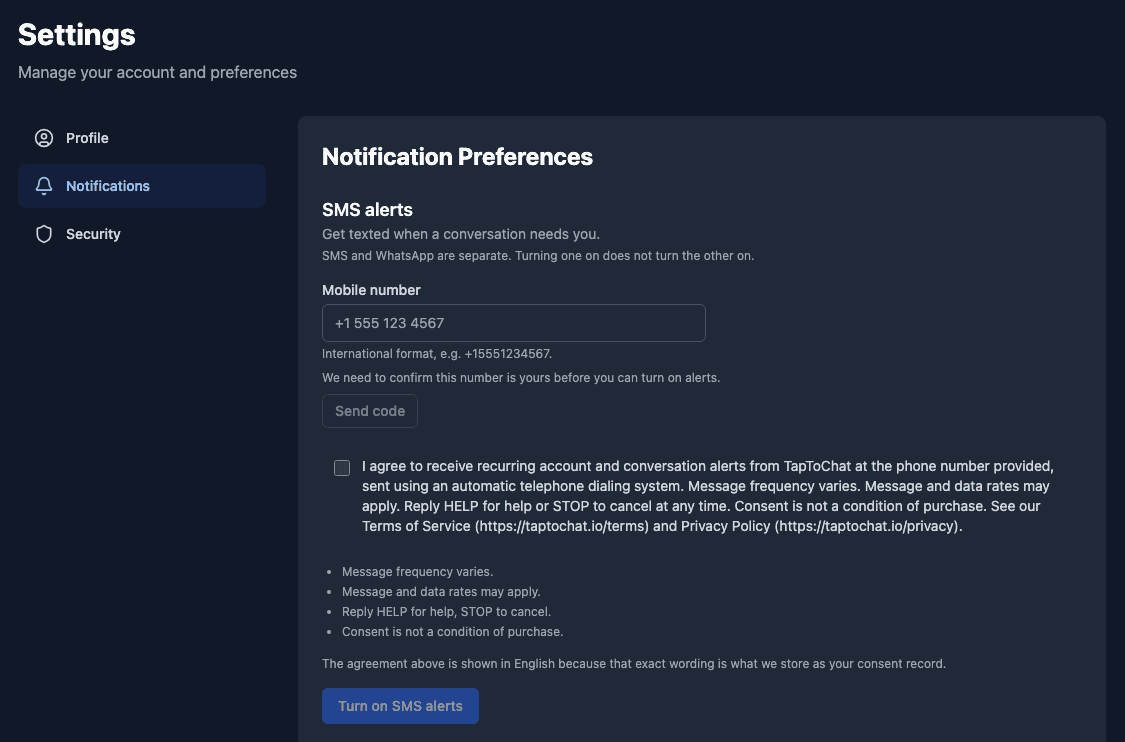
  3. Under SMS alerts, enter your mobile number and select Send code. Type in the code we text you and select Confirm, so we know the number is yours.
  4. Read the consent wording and tick the box next to it. The box is never ticked for you, and alerts cannot be turned on until you tick it.
  5. Select Turn on SMS alerts. We may then text you the confirmation shown further down this page. It is sent at most a few times a day, so turning alerts on again soon after may not send another.

Replied STOP to our texts before? Text START to the number they came from as well. Until you do, our texts to your number stay blocked, even with alerts turned on.

Sign in to opt in (opens Settings → Notifications)

Screenshot of the SMS alerts opt-in in TapToChat, under Settings → Notifications: an empty mobile number field with a Send code button, an unticked consent checkbox beside the full consent wording quoted below, and the Turn on SMS alerts button, which stays disabled until the number is confirmed and the box is ticked.
The opt-in form as a signed-in member sees it before opting in. Captured from a test account, in English.

How the opt-in is collected

In one place only: the Notifications tab of the account settings, after the person has signed in.

  1. The account holder types their own mobile number into the form.
  2. They read the wording below and tick a checkbox that is never pre-ticked. Until it is ticked, the button that turns alerts on stays disabled.
  3. The wording they agreed to, its version, the number and the timestamp are written to a consent record we keep.
  4. Turning alerts off is a single button in the same place, always available, and it writes a matching record.

Each channel is its own step. There is no control that switches both on at once.

The exact wording shown at opt-in

Reproduced here character for character from the same source the product renders and the consent record stores. This is not a summary of the agreement — it is the agreement.

SMS

Wording version 2026-09-08.v2

Text messages sent to a mobile number and delivered by a carrier.

I agree to receive recurring account and conversation alerts from TapToChat at the phone number provided, sent using an automatic telephone dialing system. Message frequency varies. Message and data rates may apply. Reply HELP for help or STOP to cancel at any time. Consent is not a condition of purchase. See our Terms of Service (https://taptochat.io/terms) and Privacy Policy (https://taptochat.io/privacy).

Shown alongside it:

  • Message frequency varies.
  • Message and data rates may apply.
  • Reply HELP for help, STOP to cancel.
  • Consent is not a condition of purchase.

Replies to expect

The automatic text messages this programme sends. They go out in English, so they are shown in English here too.

Right after you opt in
TapToChat: You are now subscribed to account and conversation alerts. Msg frequency varies. Msg&data rates may apply. Reply HELP for help, STOP to cancel.
When you reply HELP
TapToChat: Help at https://taptochat.io/contact or hello+support@taptochat.io. Msg frequency varies. Msg&data rates may apply. Reply STOP to cancel.
When you reply STOP
TapToChat: You are unsubscribed from alerts. No further messages will be sent. To resubscribe, reply START and opt in at https://taptochat.io/sms-consent

WhatsApp

Wording version 2026-09-06.v1

Messages delivered to a WhatsApp account on the same number, over data rather than by a carrier. WhatsApp alerts are not being sent yet: an opt-in is recorded, but no WhatsApp alert goes out until they launch.

I agree to receive account and conversation alerts from TapToChat on WhatsApp at the phone number provided. Message frequency varies. Reply STOP in the WhatsApp conversation to opt out at any time. Consent is not a condition of purchase. See our Terms of Service (https://taptochat.io/terms) and Privacy Policy (https://taptochat.io/privacy).

Shown alongside it:

  • Message frequency varies.
  • Reply STOP in the WhatsApp conversation to opt out.
  • Consent is not a condition of purchase.

SMS and WhatsApp are two separate agreements with two separate versions. Saying yes to one is never treated as saying yes to the other; each is recorded on its own and can be withdrawn on its own.

The two quoted paragraphs stay in English on every version of this page, including the translated ones. What we store as the consent record has to match what was on screen character for character, so a translation would make the record and the screen disagree.

More detail

Our privacy policy covers how a phone number is stored and for how long; the terms of service cover the account the alerts belong to.

Questions about this messaging programme: hello+support@taptochat.io